

You want a gym app that shows which muscles you are actually training, not just a list of exercises you logged. A gym app with a muscle map does exactly that: it turns your logged sets into a visual summary of where your training effort has gone recently. It is a summary of recorded training, not a measurement of muscle growth, an imbalance diagnosis or a guarantee of recovery.
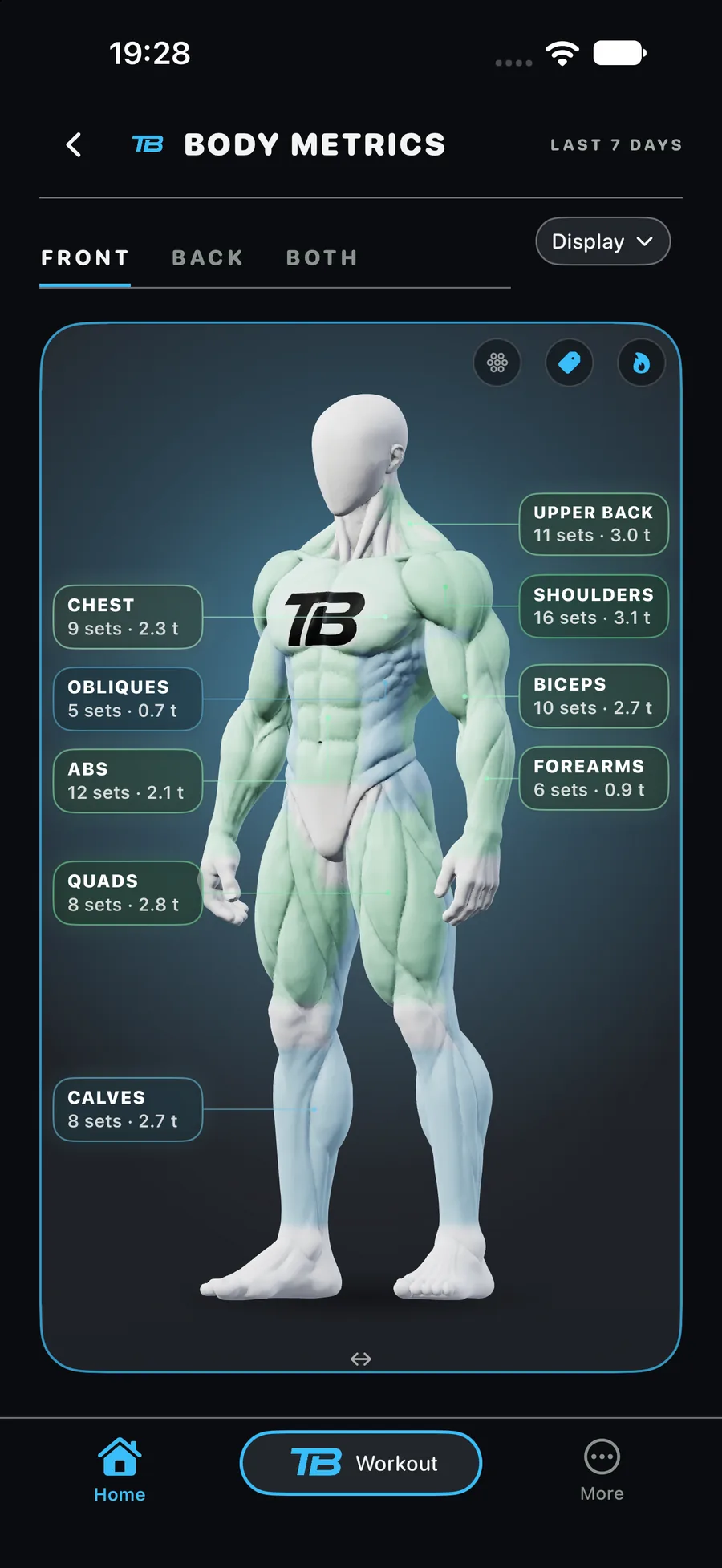
What does a muscle map actually show you?
A muscle map takes the strength training you have logged and lays it over a body diagram, usually shaded or coloured by muscle group. The idea is simple: instead of scrolling a workout history, you see at a glance which areas have had attention this week and which have had little or none.
This is a summary of what you recorded, not a scan of your body. If you logged three sessions of pressing and no pulling, the map will show that pattern. It cannot tell you whether a muscle has grown, whether you are actually imbalanced in a physical sense, or whether you are recovered enough to train it again. Those are different questions that need different tools or professional input.
In TotalBodyIQ, this is covered by muscle map and muscle balance features, both part of Body Metrics, which is Free.
Muscle map, muscle balance or body metrics: what is the difference?
These terms get used loosely, so it helps to separate them before you pick an app or a plan.
- Muscle map: a visual diagram showing which muscle groups you have trained and roughly how recently.
- Muscle balance: a comparison across muscle groups or movement patterns, for example pushing versus pulling, over a chosen period.
- Body Metrics: the wider set of summaries built from your logged training, which can include the map, balance view, readiness and weekly load.
All of these summarise training you have already logged. None of them replace proper movement screening or medical advice, and none of them can confirm an injury risk. If you want the full picture of how these pieces fit together, see muscle balance in gym training.
How do you use a muscle map to plan your next session?
The practical value of a muscle map is spotting gaps quickly, then deciding what to do about them. A simple illustrative example: if your map shows heavy shading on chest and shoulders but almost nothing on back or hamstrings over the past week, that is a prompt to balance your next session or two toward the underworked areas. This is a hypothetical pattern to show the logic, not a result from a specific user.
- Open the map or balance view after logging a few sessions, so there is enough data to read.
- Look for muscle groups that are pale or untouched over your chosen time window.
- Pick your next session, or adjust an existing plan, to include work for those groups.
- Keep logging consistently, since the map is only as useful as the training you record.
In TotalBodyIQ you can build sessions manually, follow Balanced or My Plan, or choose a pre-designed programme, all on the Free plan. If you later want sessions generated for you based on your training data, that is the Custom Workout Generator, which is optional Pro.
What a muscle map cannot tell you
It is worth being clear about the limits, because a map can look more authoritative than it is.
- It cannot measure muscle size, strength gains or hypertrophy. It reflects training frequency and volume you logged, not physiological change.
- It cannot diagnose a real muscular imbalance. A gap in the map may simply mean you have not logged that type of training, not that your body is structurally uneven.
- It cannot confirm recovery or readiness on its own. Readiness summaries in an app are based on your training pattern, not a medical or physiological test.
- It only reflects what you log. Sessions done outside the app, or logged inconsistently, will leave gaps that are about your logging habits, not your training.
If you want to understand readiness scores specifically, see training readiness score.
Who does a muscle map suit, and who might not need it?
A muscle map is most useful if you train with some variety, across several muscle groups or movement patterns, and want a quick visual check rather than reading through a full history. It also helps if you are coming back from a break and want a fast sense of what has had the least recent attention.
It is less useful if you follow a single fixed programme with no variation, since the map will simply confirm the same pattern every week. It is also not a substitute for working with a coach or clinician if you suspect a genuine physical imbalance or injury risk, since that needs assessment the app cannot provide.
Choosing between apps: what to check before you commit
If you are comparing gym apps on this specific feature, a few practical questions will tell you more than marketing copy.
| Question to ask | Why it matters |
|---|---|
| Is the muscle map free or locked behind a subscription? | Some apps gate basic summaries; check what you actually get without paying. |
| Does it update from manual logging, or only from a specific plan type? | You want it to reflect however you actually train, not just one workout style. |
| What time window does it use: a week, a month, or adjustable? | A fixed short window can overstate gaps if you train in longer cycles. |
| Does the app distinguish logged training from any claim about recovery or growth? | Clear language here tells you whether the app is being realistic about what it measures. |
TotalBodyIQ includes body maps, muscle balance, readiness and weekly load as part of Free Body Metrics, alongside strength logging and full workout history. For a broader comparison against other logging apps, see TotalBodyIQ vs Hevy, Strong and Fitbod.
Frequently asked questions
Is a muscle map the same as a muscle anatomy diagram?
No. An anatomy diagram shows where muscles sit in the body for reference or learning. A muscle map in a gym app shows which of your logged sessions trained which muscle groups, so it reflects your training history rather than general anatomy.
Does a muscle map work if I only log some of my workouts?
It will only reflect what you log, so gaps on the map may simply mean a session was not recorded rather than a muscle group being neglected. Consistent logging gives a more accurate picture.
Can a muscle map replace advice from a coach or physiotherapist?
No. It summarises training volume and frequency, not physical assessment, so it cannot diagnose an imbalance, injury risk or movement issue that needs professional input.
Is the muscle map feature free in TotalBodyIQ?
Yes. Body Metrics, including the muscle map and muscle balance view, is part of the Free plan alongside strength logging and full workout history.